Important: Login Method for NDL Search and Related Services Changed on June 17, 2026
In order to enhance security, authentication for registered users logging in to the National Diet Library Search, the National Diet Library Digital Collections, and related websites changed to an email-based authentication system on June 17, 2026.
*There are no changes to any functions other than the login method (for example, you can continue to use the National Diet Library Search for bibliographic searches and saving bibliographic records to a file, and access the National Diet Library Digital Collections to search and view content marked “Available without login” without logging in).
New Authentication Method
Under the new authentication method, you will be required to enter a one-time authentication code sent to your registered email address in addition to your User ID and password to log in. If you have not yet registered an email address, you can register your email address on the screen displayed after logging in. It is convenient to use an email address that you can check at any time, such as on your smartphone.
Login Procedure under the New Authentication Method
- Enter your User ID and password on the login screen, and click the Log In button.

If you check the Keep Me Logged In checkbox and log in successfully, you will not need to log in each time.
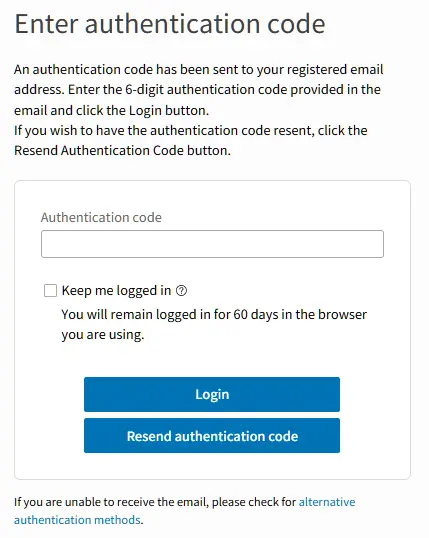
Click the Log In button to display the Enter Authentication Code dialog.
Using the Keep Me Logged In checkbox
If you check the Keep Me Logged In checkbox and log in successfully, you will remain logged in on that device for 60 days. During that period, you will not need to enter your User ID, password, or authentication code to access the website.
Please do not use the Keep Me Logged In checkbox on devices that are shared with others, such as computers at your workplace or school.
- Check the authentication code sent to your registered email address.
An email containing the authentication code will be sent to your registered email address from the ndl.go.jp domain. The six-digit number shown in the red box in the image below is the authentication code. Use your email software or application to read the mail and check the authentication code.
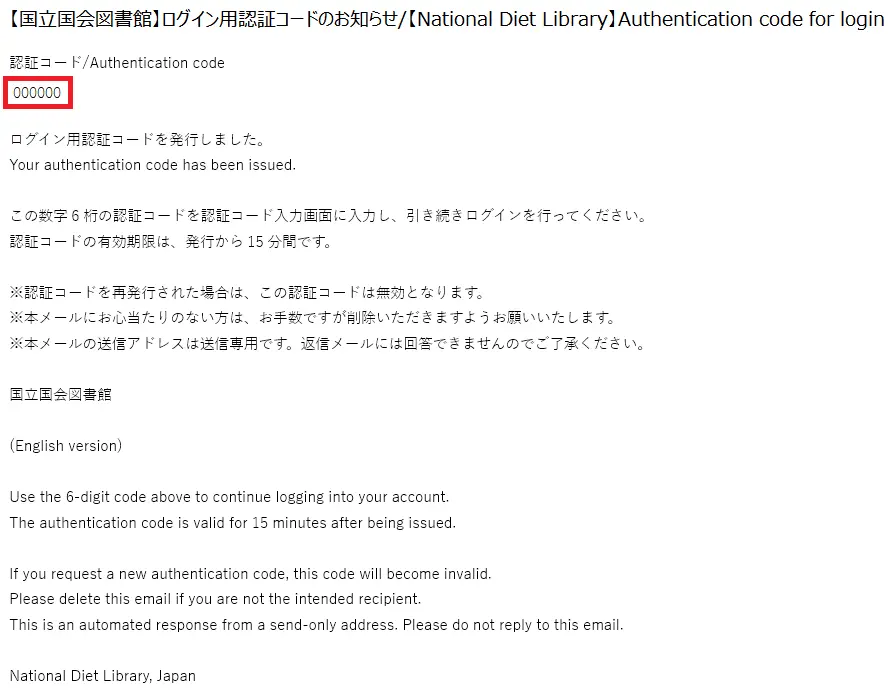
Please be aware that the email sent by the NDL to notify you of your authentication code does not contain any URLs. Please beware of phishing scams sent from scammers.
Please also be sure that appropriate security measures are in place for your email account.
- Enter the authentication code to log in.
Enter the six-digit authentication code shown under Authentication Code in the email you receive in the Enter Authentication Code dialog to complete your login.
Frequently Asked Questions (FAQ)
Answers to frequently asked questions are provided on the following page. Please check this page before making an inquiry.